
Overview and architecture
F5 NGINXaaS for AWS is a SaaS offering that is tightly integrated into AWS and its ecosystem of services, making applications fast, efficient, and reliable. It brings advanced traffic management capabilities from the commercial version of NGINX, without any of the operational toil.
NGINX Plus powers NGINXaaS for AWS, which extends NGINX Open Source with advanced functionality and provides customers with a complete application delivery solution.
NGINXaaS handles the NGINX Plus license management automatically.
Prerequisites
Create a deployment
Add certificates
Get help
The key capabilities of NGINXaaS for AWS are:
- Simplifies onboarding and use of NGINX by providing a fully managed, ready-to-use service, eliminating the need for infrastructure setup or manual upgrades.
- Lowers operational overhead in running and optimizing NGINX.
- Simplifies NGINX deployments with fewer moving parts (edge routing is built into the service).
- Supports migration of existing NGINX configurations to the cloud with minimal effort.
- Integrates with the AWS ecosystem.
- Adopts a consumption-based pricing to align infrastructure costs to actual usage by billing transactions using AWS.
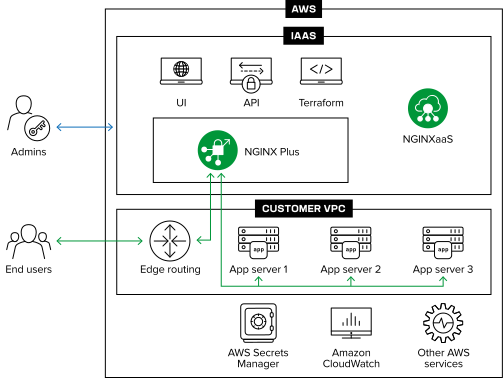
- The NGINXaaS Console is used to create, update, and delete NGINX configurations, certificates and NGINXaaS deployments
- NGINXaaS automatically adapts to application traffic demands through autoscaling
- Each NGINXaaS deployment has dedicated network and compute resources. There is no possibility of noisy neighbor problems or data leakage between deployments
- NGINXaaS acts as a load balancer, API gateway, and reverse proxy, enabling you to keep your application workloads secure within your AWS account while serving traffic reliably and efficiently
- NGINXaaS for AWS supports the following capabilities:
- HTTP, HTTP/2, HTTP/3, and gRPC traffic
- Layer 4 and Layer 7 load balancing with configurable balancing methods
- IPv4 and IPv6 traffic
- UDP, TCP, and QUIC protocols
- Private or public internet client ingress
- Request tracing
- HTTP to HTTPS, HTTPS to HTTP, and HTTP to HTTP redirects
- NGINXaaS also provides the ability to create new rules for redirecting. See How to Create NGINX Rewrite Rules | NGINX for more details
The service frontend of an NGINXaaS deployment controls how client ingress traffic reaches your deployment. There are two frontend types: managed public endpoint and private endpoint.
A managed public endpoint frontend allows client access over the internet through a public DNS name created by NGINXaaS in its network.
This frontend type is suitable for:
- Serving public web applications to end users over the internet
- Proxying traffic from clients outside AWS
- Testing NGINXaaS configurations before you set up a Private endpoint frontend
Access control
Access control list (ACL) rules control traffic to a managed public endpoint deployment. If you don’t provide ACL rules, no traffic is allowed. An ACL rule includes the following settings:
- Source prefixes: A list of CIDR blocks to allow traffic from
- Use
0.0.0.0/0,::0/0to allow traffic from all source IP addresses
- Use
- Protocol: The network protocol to allow
- Valid values are TCP and UDP
- Required when you specify a port or port range
- Port range: A single port or port range to allow traffic from
- If you don’t specify a port range, traffic is allowed from any port
- Required when you specify a protocol
A private endpoint frontend allows client access through your network by using AWS PrivateLink. To set up connectivity, create an interface VPC endpoint in your own VPC that connects to the VPC endpoint service provisioned for your NGINXaaS deployment. This approach enables any applications or clients in your VPC to connect directly to the NGINXaaS deployment via private networking. For step-by-step instructions, see Set up connectivity.
This frontend type is suitable for:
- Situations where you need greater control over traffic to the NGINXaaS deployment
- Environments where all clients exist within your AWS network
- Internal services that shouldn’t be exposed to the internet
Access control
A PrivateLink connection allow list restricts which AWS account IDs or VPC endpoint IDs can connect to the deployment. If you don’t specify any entries in the allow list, no PrivateLink connections will be accepted. The allow list can be modified at any time to add or remove access permission for any AWS accounts or VPC endpoints.
NGINXaaS uses AWS VPC Peering to connect privately to your upstream applications.
A VPC peering connection brings the deployment into your application network and supports secure, private connectivity to your upstream services. By managing your own VPC routing and security group rules, you control traffic flow and can apply your preferred security controls.
To connect NGINXaaS to your upstream VPC, you must create a VPC peering connection from your AWS account targeting the NGINXaaS deployment’s AWS Account ID and VPC ID, then add the peering connection ID to your deployment.
CIDR overlapUpstream VPC CIDRs must not overlap with the NGINXaaS deployment VPC CIDRs, or the CIDRs of other peered upstream VPCs. If CIDRs overlap, VPC peering will fail.
An NGINX Capacity Unit (NCU) quantifies the capacity of an NGINX deployment based on its underlying compute resources. This abstraction lets you specify capacity in NCUs without considering hardware differences between regions. You can reserve a minimum capacity for your deployment. The deployment automatically scales up or down based on traffic demand and makes sure it never drops below the reserved minimum.
NGINXaaS for AWS has a global presence, with management requests served by regional controllers. A geographical controller (GC) is a control plane that serves users within a defined geographic boundary while addressing data residency and localization requirements. For example, a US geographical controller serves customers in the United States. NGINXaaS currently operates in three geographies: US, EU, and Asia Pacific (APAC).
NGINXaaS for AWS is supported in the following regions per geography:
| NGINXaaS Geography | AWS Regions |
|---|---|
| US | us-east-1, us-east-2, us-west-1, us-west-2 |
| EU | eu-west-1, eu-west-2, eu-west-3, eu-central-1, eu-north-1 |
| APAC | ap-northeast-1, ap-northeast-2, ap-south-1, ap-south-2, ap-southeast-1, ap-southeast-4 |
| CA | ca-central-1, ca-west-1 |
We are committed to enhancing NGINXaaS for AWS and welcome your feedback to help shape the future of our service. If there are features you’d like to see prioritized, we encourage you to submit a support ticket to share your suggestions.
Here are the current constraints you should be aware of while using NGINXaaS for AWS:
- User Role-Based Access Control (RBAC) is not yet supported, but this enhancement is on our roadmap as we improve access control for multi-user environments.
- PrivateLink and upstream VPC peering connections must remain within the same AWS region as your deployment. Cross-region connections are not currently supported.
- NGINXaaS deployments on AWS can only support up to 50 unique listen ports.
- While NGINXaaS deployments on AWS can be configured for UDP and QUIC traffic, it requires that the deployment is listening for that traffic on IPv6. Note: this does not require the incoming client traffic, or upstream traffic to be IPv6.
To get started, check the NGINXaaS for AWS prerequisites