# Synchronizing NGINX Configuration in a Cluster
> Sychronize configuration across a cluster of F5 NGINX Plus instances. Though designed for high-availability deployments, the solution works for any cluster.
## Overview
NGINX Plus is often deployed in a high‑availability (HA) cluster of two or more devices. The configuration sharing feature enables you to push configuration from one machine in the cluster (the primary) to its peers:
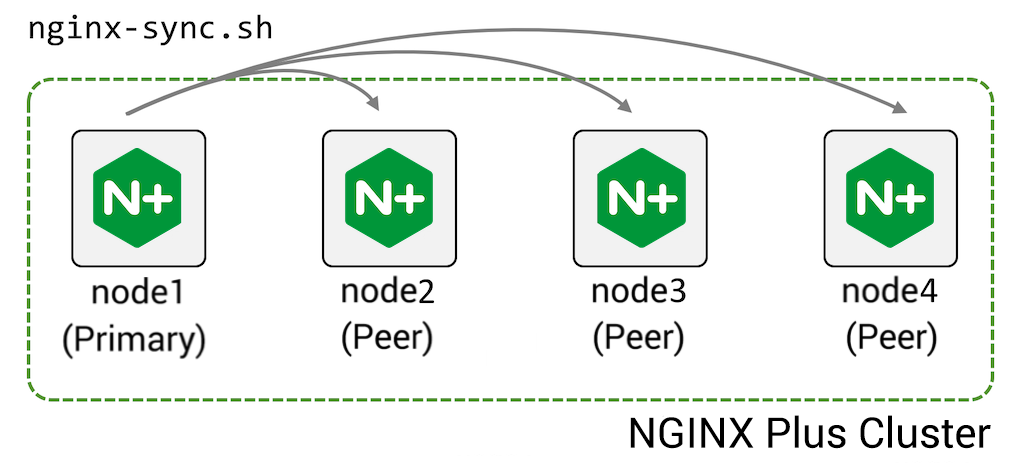
To configure this feature:
1. [Install](#in_detail1) the **nginx-sync** package on the primary machine
2. [Grant](#in_detail2) the primary machine ssh access as `root` to the peer machines
3. [Create](#in_detail3) the configuration file **/etc/nginx-sync.conf** on the primary machine:
```none
NODES="node2.example.com node3.example.com node4.example.com"
CONFPATHS="/etc/nginx/nginx.conf /etc/nginx/conf.d"
EXCLUDE="default.conf"
```
4. [Run](#in_detail4) the `nginx-sync.sh` command on the primary node to push the configuration files name in `CONFPATHS` to the specified `NODES`, omitting configuration files named in `EXCLUDE`.
`nginx-sync.sh` includes a number of safety checks:
- Verifies system prerequisites before proceeding
- Validates the local (primary) configuration (`nginx -t`) and exits if that fails
- Creates remote backup of the configuration on each peer
- Pushes the primary configuration to the peers using `rsync`, validates configuration on the peers (`nginx -t`), and if successful reloads NGINX Plus on the peers (`service nginx reload`)
- If any step fails, rolls back to the backup on the peers
## Instructions
### Installing nginx-sync on the Primary Machine
Install the NGINX Synchronization module package `nginx-sync` on the Primary machine. Check the [Technical Specifications](nginx/technical-specs.md) page to verify that the module is supported by your operating system.
- For Amazon Linux 2, CentOS, Oracle Linux, and RHEL:
```shell
sudo yum install nginx-sync
```
- For Amazon Linux 2023, AlmaLinux, Rocky Linux:
```shell
sudo dnf install nginx-sync
```
- For Ubuntu or Debian:
```shell
sudo apt-get install nginx-sync
```
- For SLES:
```shell
sudo zypper install nginx-sync
```
### Configuring root SSH Access to the Peers
This procedure enables the `root` user on the primary node to ssh to the `root` account on each peer, which is required to `rsync` files to the peers and run commands on the peers to validate the configuration, reload NGINX Plus, and so on.
1. On the primary node, generate an SSH authentication key pair for `root` and view the public part of the key:
```shell
sudo ssh-keygen -t rsa -b 2048
sudo cat /root/.ssh/id_rsa.pub
ssh-rsa AAAAB3Nz4rFgt...vgaD root@node1
```
2. Get the IP address of the primary node (in the following example, `192.168.1.2`):
```shell
ip addr
1: lo: mtu 65536 qdisc noqueue state UNKNOWN group default
link/loopback 00:00:00:00:00:00 brd 00:00:00:00:00:00
inet 127.0.0.1/8 scope host lo
valid_lft forever preferred_lft forever
inet6 ::1/128 scope host
valid_lft forever preferred_lft forever
2: eth0: mtu 1500 qdisc pfifo_fast state UP group default qlen 1000
link/ether 52:54:00:34:6c:35 brd ff:ff:ff:ff:ff:ff
inet 192.168.1.2/24 brd 192.168.1.255 scope global eth0
valid_lft forever preferred_lft forever
inet6 fe80::5054:ff:fe34:6c35/64 scope link
valid_lft forever preferred_lft forever
```
3. On each peer node, append the public key to `root`’s **authorized_keys** file. The `from=192.168.1.2` prefix restricts access to only the IP address of the primary node:
```shell
sudo mkdir /root/.ssh
sudo echo 'from="192.168.1.2" ssh-rsa AAAAB3Nz4rFgt...vgaD root@node1' >> /root/.ssh/authorized_keys
```
4. Add the following line to **/etc/ssh/sshd_config**:
```none
PermitRootLogin without-password
```
5. Reload `sshd` on each peer (but not the primary) to allow SSH key authentication
- for Amazon Linux, AlmaLinux, CentOS, Oracle Linux, RHEL, Rocky Linux:
```shell
sudo systemctl restart sshd
```
- for Ubuntu, Debian, SLES:
```shell
sudo systemctl restart ssh
```
6. Verify that the `root` user can `ssh` to each of the other nodes without providing a password:
```shell
sudo ssh root@node2.example.com
```
### Creating the nginx-sync.conf Configuration File on the Primary Node
On the primary node, create the file **/etc/nginx-sync.conf** with these contents:
```none
NODES="node2.example.com node3.example.com node4.example.com"
CONFPATHS="/etc/nginx/nginx.conf /etc/nginx/conf.d"
EXCLUDE="default.conf"
```
#### Common Parameters
Use a space or newline character to separate the items in each list:
| Parameter | Description |
| ------------------------ | -------------------------------------------------------------------------------------|
| `NODES` | List of peers that receive the configuration from the primary. |
| `CONFPATHS` | List of files and directories to distribute from the primary to the peers. |
| `EXCLUDE` | (Optional) List of configuration files on the primary not to distribute to the peers.|
#### Advanced Parameters
| Parameter | Description | Default |
| ------------------------ | ---------------------------------------------------------------------------------------|-------------------------|
| `BACKUPDIR` | Location of backup on each peer | **/var/lib/nginx-sync** |
| `DIFF` | Location of `diff` binary | **/usr/bin/diff** |
| `LOCKFILE` | Location of the lock file used to ensure only one `nginx-sync` operation runs at a time| **/tmp/nginx-sync.lock**|
| `NGINX` | Location of the **nginx-plus** binary | **/usr/sbin/nginx** |
| `POSTSYNC` | Space-separated list of file substitutions to make on each remote node in the format: `'\\|\'`
The substitution is applied in place: `sed -i' ' \ \` For example, to substitute the IP address of *node2.example.com* (*192.168.2.2*) for the IP address of *node1.example.com* (*192.168.2.1*) in *keepalived.conf*: `POSTSYNC="/etc/keepalived/keepalived.conf\|'s/192\.168\.2\.1/192.168.2.2/'"` | |
| `RSYNC` | Location of the `rsync` binary | **/usr/bin/rsync** |
| `SSH` | Location of the `ssh` binary | **/usr/bin/ssh** |
### Testing the Configuration
Back up the configuration before testing.
- Synchronize configuration and reload F5 NGINX Plus on the peers – `nginx-sync.sh`
- Display usage information – `nginx-sync.sh -h`
- Compare configuration between the primary and a peer – `nginx-sync.sh -c `
- Compare configuration on the primary to all peers – `nginx-sync.sh -C`
## Frequently Asked Questions
### Why Do I Need to Grant SSH Access to `root`?
The primary node needs to be able to remotely run commands on the peer as the `root` user (for example, `service nginx reload`), and needs to be able to update configuration files (for example, in **/etc/nginx/**) that are owned by `root`.
It might seem that granting SSH access to `root` is giving away too many privileges, but it is important to remember that any process that can write remote NGINX Plus configuration and reload the remote NGINX Plus process can subvert this process to gain remote `root` access to the server.
Therefore, assume that users who gain `root` access on the primary node also have `root` access on the peer nodes.
### How Do I Synchronize Configuration if the Primary Fails?
If the primary fails and will not soon return to service, you need to promote a peer to operate as primary by following the instructions in [Installation](#instructions). This involves
1. [Installing the `nginx-sync.sh` script](#in_detail1)
2. [Granting SSH access to the remaining peers](#in_detail2)
3. [Creating the configuration file](#in_detail3)
You can preconfigure several machines to operate as primary, but must ensure that only one node actually runs as primary at a given time.
### What Happens if a Peer Node Fails?
If a peer node fails, it no longer receives configuration updates. The `nginx-sync.sh` script returns an error but continues to distribute the configuration to the remaining peers.
When the node recovers, its configuration is out of date. You can display the configuration differences by running `nginx-sync.sh -c -d`:
```shell
nginx-sync.sh -c node2.example.com -d
```
The output of the command:
```diff
diff -ru /tmp/localconf.1XrIqP7f/etc/nginx/conf.d/responder.conf /tmp/remoteconf.Xq5LWGKU/etc/nginx/conf.d/responder.conf
--- /tmp/localconf.1XrIqP7f/etc/nginx/conf.d/responder.conf 2020-09-25 10:29:36.988064021 -0800
+++ /tmp/remoteconf.Xq5LWGKU/etc/nginx/conf.d/responder.conf 2020-09-25 10:28:39.764066539 -0800
@@ -4,6 +4,6 @@
listen 80;
location / {
- return 200 "Received request on $server_addr on host $hostname blue\n";
+ return 200 "Received request on $server_addr on host $hostname red\n";
}
}
* Synchronization ended at Fri Sep 25 18:30:49 UTC 2020
```
The next time you run `nginx-sync.sh`, the node gets updated with the current primary configuration.